Beta Paprika ist noch in der Beta. Bis zur Version 1.0 können sich API, Konfiguration und Datenformate ändern. Paprika is still in beta. Until version 1.0, the API, configuration and data formats may change.

Ein Backend für mandantenfähige Apps, jeder Mandant in seiner eigenen Datenbank. A backend for multi-tenant apps, each tenant in its own database.

Paprika trennt jeden Mandanten in eine eigene Datenbank, mit eigenen Nutzern und eigenen Dateien. REST-API, Auth und Zugriffsregeln sind dabei, und alles läuft auf deinem eigenen Server.

Paprika keeps every tenant in its own database, with its own users and files. REST API, auth and access rules are included, and everything runs on your own server.

  • MandantenTenants
  • REST-API
  • Auth & 2FA
  • ZugriffsregelnAccess rules
  • DateienFiles
  • Realtime
  • Webhooks
  • Admin-UI
POST /api/collections/posts
$ curl -X POST https://api.example.com/api/collections/posts \
    -H "Authorization: Bearer $TOKEN" \
    -d '{"title":"Hello Paprika"}'

{
  "id": "6710c3f2a1…",
  "title": "Hello Paprika",
  "createdAt": "2026-10-02T09:41:00Z"
}
  • Eine Datenbank pro MandantOne database per tenant

    Jeder Mandant hat eigene Nutzer, Collections und Dateien. Keine gemeinsame Tabelle mit Filterspalte, bei der ein vergessener Filter fremde Daten zeigt.

    Every tenant has its own users, collections and files. No shared table with a filter column, where one forgotten filter exposes someone else's data.

  • Ein Dienst, nicht zehnOne service, not ten

    Es laufen nur Paprika und MongoDB. Die Admin-UI ist im selben Binary enthalten.

    Only Paprika and MongoDB run. The admin UI is part of the same binary.

  • Regeln statt Policy-CodeRules, not policy code

    Wer was lesen und schreiben darf, legst du pro Operation in der Admin-UI fest. SQL-Policies oder eigene Funktionen brauchst du dafür nicht.

    You decide per operation in the admin UI who may read and write what. No SQL policies or custom functions needed.

  • Eine Version für alleOne version for everyone

    Keine Enterprise-Edition, keine gesperrten Features. Nur die Lizenz hängt von der Nutzung ab.

    No enterprise edition, no locked features. Only the license depends on how you use it.

Mandanten, sauber getrenntTenants, kept apart

Für jeden Mandanten legt Paprika eine eigene Datenbank an, ob du einen brauchst oder viele. Das kann ein Kunde sein, ein Standort oder eine eigene Umgebung.

Paprika creates a separate database for every tenant, whether you need one or many. That can be a customer, a location or its own environment.

Echte DatentrennungReal data isolation

Jeder Mandant liegt in einer eigenen MongoDB-Datenbank. Eine Anfrage sieht immer nur die Datenbank ihres Mandanten, ein vergessener Filter kann keine fremden Daten zeigen.

Every tenant lives in its own MongoDB database. A request only ever sees the database of its tenant, so a forgotten filter cannot expose someone else's data.

Eigene Nutzer pro MandantSeparate users per tenant

Nutzerkonten liegen in der Datenbank ihres Mandanten. Registrierung, Passwort-Reset und E-Mail-Verifizierung schaltest du für jeden Mandanten einzeln.

User accounts live in their tenant's database. Registration, password reset and email verification are switched on per tenant.

Anpassbar pro MandantCustomisable per tenant

Jeder Mandant hat eigene Collections, Regeln und Hooks. Ein Mandant kann ein zusätzliches Feld bekommen, ohne dass die anderen davon etwas merken. Ein Schema überträgst du per Export und Import.

Every tenant has its own collections, rules and hooks. One tenant can get an extra field without the others noticing. You move a schema with export and import.

Logs pro MandantLogs per tenant

Die Request-Logs liegen in der Datenbank des Mandanten. Du siehst gezielt, was dort passiert, und mit dem Mandanten verschwinden auch seine Logs.

Request logs live in the tenant's database. You see exactly what happens there, and the logs go away together with the tenant.

Sauber löschenClean deletion

Einen Mandanten löschst du vollständig. Datenbank und hochgeladene Dateien sind in einem Schritt weg. Das hilft auch beim Löschen nach DSGVO.

Deleting a tenant removes it completely. Database and uploaded files are gone in one step, which also helps with GDPR deletion requests.

Ein System für alleOne system for all

Alle Mandanten laufen in einer Installation. Du hältst ein System aktuell, auch wenn mehrere Mandanten darin laufen.

All tenants run in one installation. You keep a single system up to date, even when several tenants run in it.

Features

Eingerichtet wird alles in der Admin-UI. Code schreibst du nur in deiner App.

Everything is set up in the admin UI. You only write code in your app.

REST-API

Jede Collection ist sofort als JSON-API erreichbar, ohne Codegenerierung und ohne Deploy. Paginierung, Validierung und einheitliche Fehlermeldungen sind dabei.

Every collection is available as a JSON API right away, without code generation or a deploy. Pagination, validation and consistent error responses are included.

DatenmodellData model

Zwölf Feldtypen, von Text und Zahl bis Relation, Datei und Auswahl, dazu Pflichtfelder, Defaults und Unique-Indizes. Jeder Datensatz bekommt automatisch eine ID und Zeitstempel.

Twelve field types, from text and number to relation, file and select, plus required fields, defaults and unique indexes. Every record gets an ID and timestamps automatically.

AuthentifizierungAuthentication

Nutzer melden sich per JWT an, Server nutzen API-Keys. Passwort-Reset und E-Mail-Verifizierung schaltest du pro Mandant frei, Superadmins können sich mit TOTP absichern.

Users sign in with JWT, servers use API keys. Password reset and email verification are enabled per tenant, and superadmins can protect their account with TOTP.

ZugriffsregelnAccess rules

Öffentlich, angemeldet, eigene Datensätze, Gruppe oder gesperrt, jeweils für Auflisten, Ansehen, Anlegen, Ändern und Löschen. Feste Vorgaben statt selbst geschriebener Ausdrücke halten die Regeln überprüfbar. Für Sonderfälle gibt es Before-Hooks.

Public, signed in, own records, group or locked, set separately for list, view, create, update and delete. Fixed presets instead of hand-written expressions keep the rules easy to review. For special cases there are before hooks.

DateienFiles

Uploads sind ein Feld im Schema, mit Grenzen für Typ, Größe und Anzahl. Es gelten dieselben Regeln wie für den Datensatz, und beim Löschen wird aufgeräumt.

Uploads are a schema field with limits for type, size and count. The record's rules apply, and files are cleaned up on delete.

Realtime

Abonniere eine Collection oder einen einzelnen Datensatz per Server-Sent Events. Jedes Event wird vorher gegen die Regeln geprüft.

Subscribe to a collection or a single record via Server-Sent Events. Every event is checked against the rules first.

Webhooks

Before-Hooks können eine Anfrage ablehnen oder ändern, After-Hooks laufen asynchron. Alle sind signiert, und empfangen kannst du sie in jeder Sprache.

Before hooks can reject or change a request, after hooks run asynchronously. All of them are signed, and you can receive them in any language.

Admin-UI

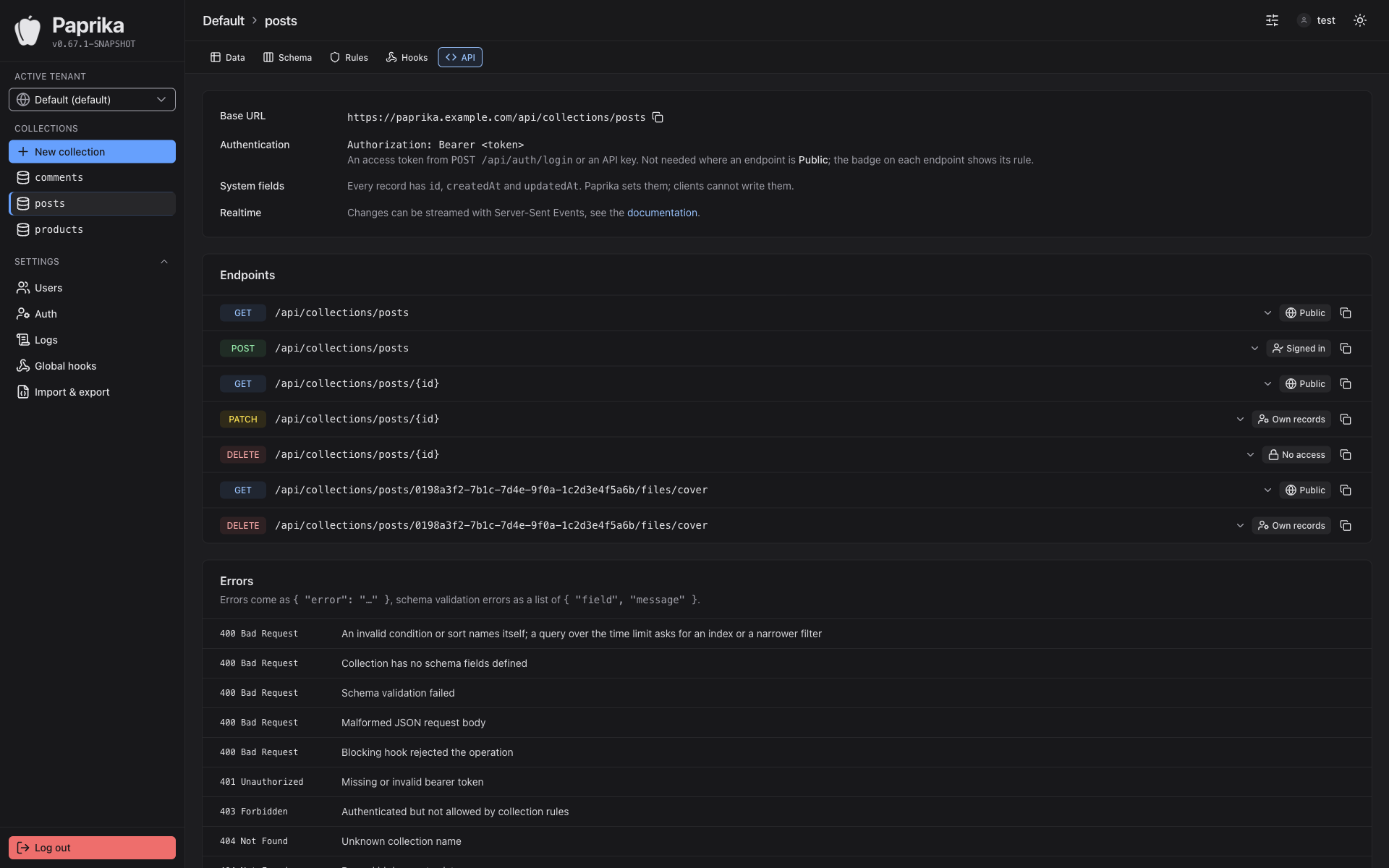
Mandanten, Schema, Daten, Regeln und Hooks pflegst du in einer Oberfläche. Dazu gibt es eine generierte API-Doku und durchsuchbare Request-Logs.

Tenants, schema, data, rules and hooks are managed in one interface. It also has generated API docs and searchable request logs.

Backup & Restore

Sicherungen erstellst und spielst du direkt in der Admin-UI ein. Zusätzliche Werkzeuge brauchst du dafür nicht.

You create and restore backups right in the admin UI. No extra tools needed.

Sicher voreingestellt:Secure by default: Argon2 HMAC-SHA256 Generierte SecretsGenerated secrets systemd-Sandboxingsystemd sandboxing Security Policy

Installation

Ein Befehl. Danach den Setup-Link aus dem Log öffnen und den ersten Admin anlegen.

One command. Then open the setup link from the log and create the first admin.

# Paprika + MongoDB per Docker ComposePaprika + MongoDB via Docker Compose
$ curl -fsSL https://raw.githubusercontent.com/svenkubiak/paprika/main/install-docker.sh | bash

Installationsanleitung in der Dokumentation →Installation guide in the docs →

Screenshots

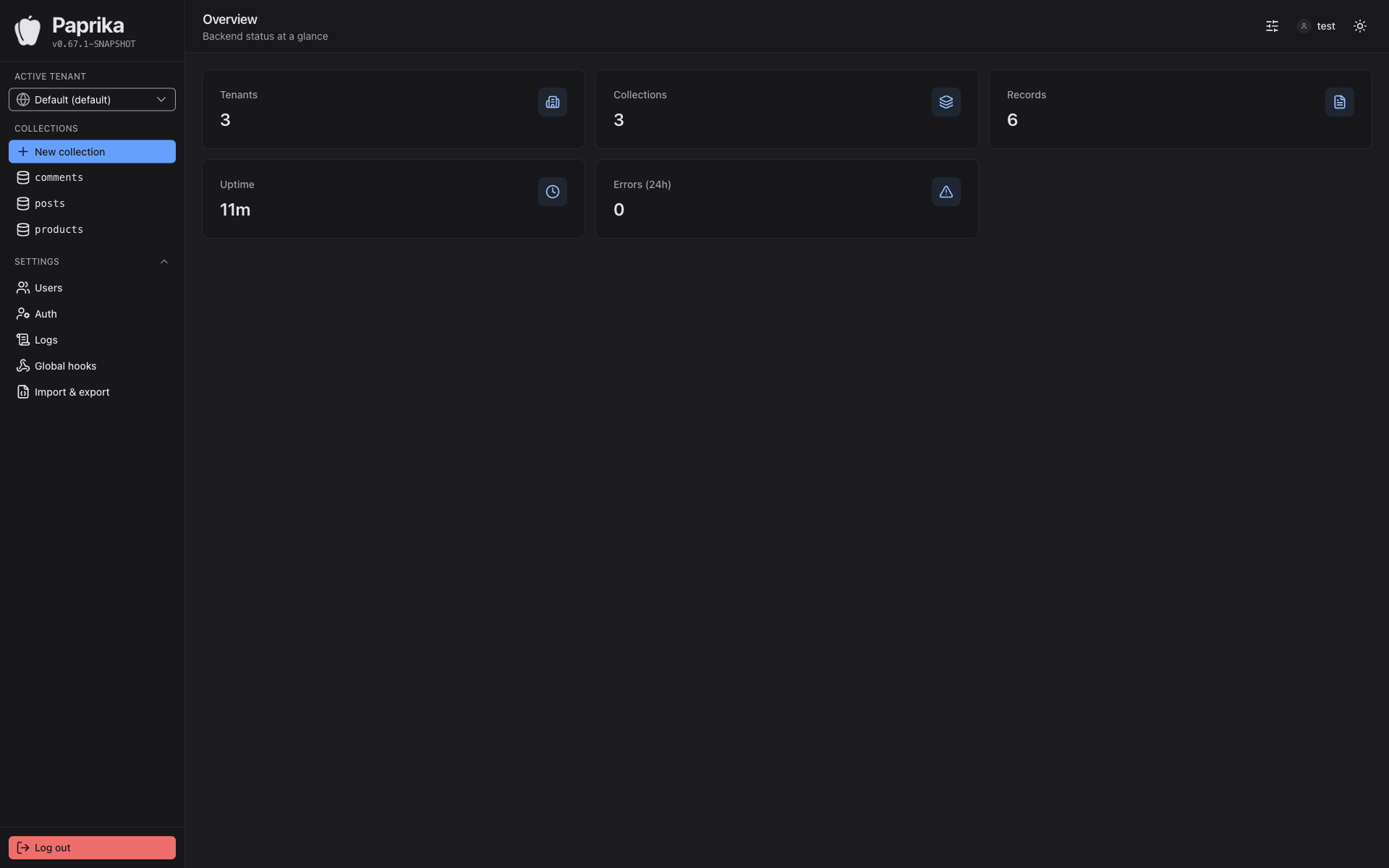
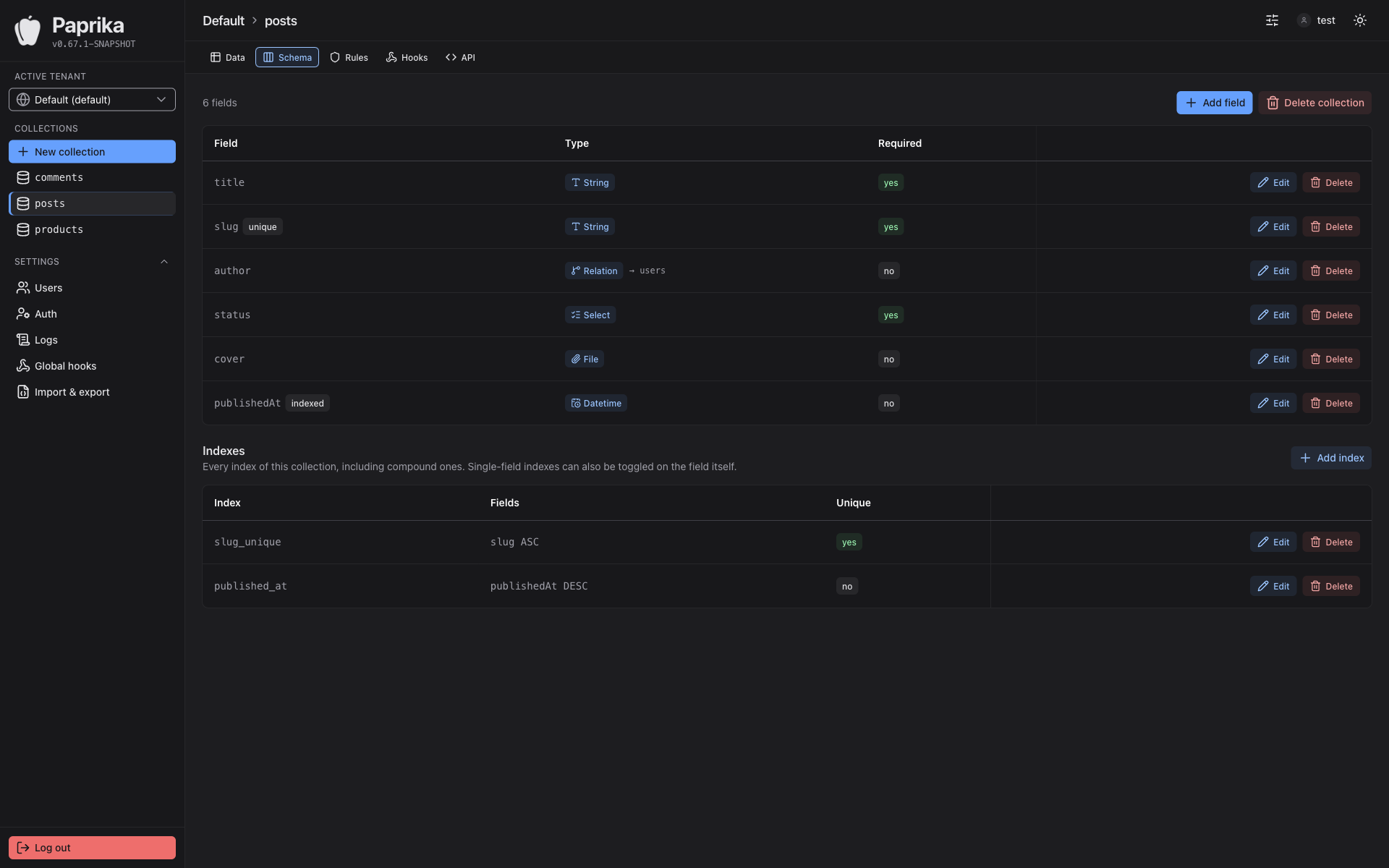
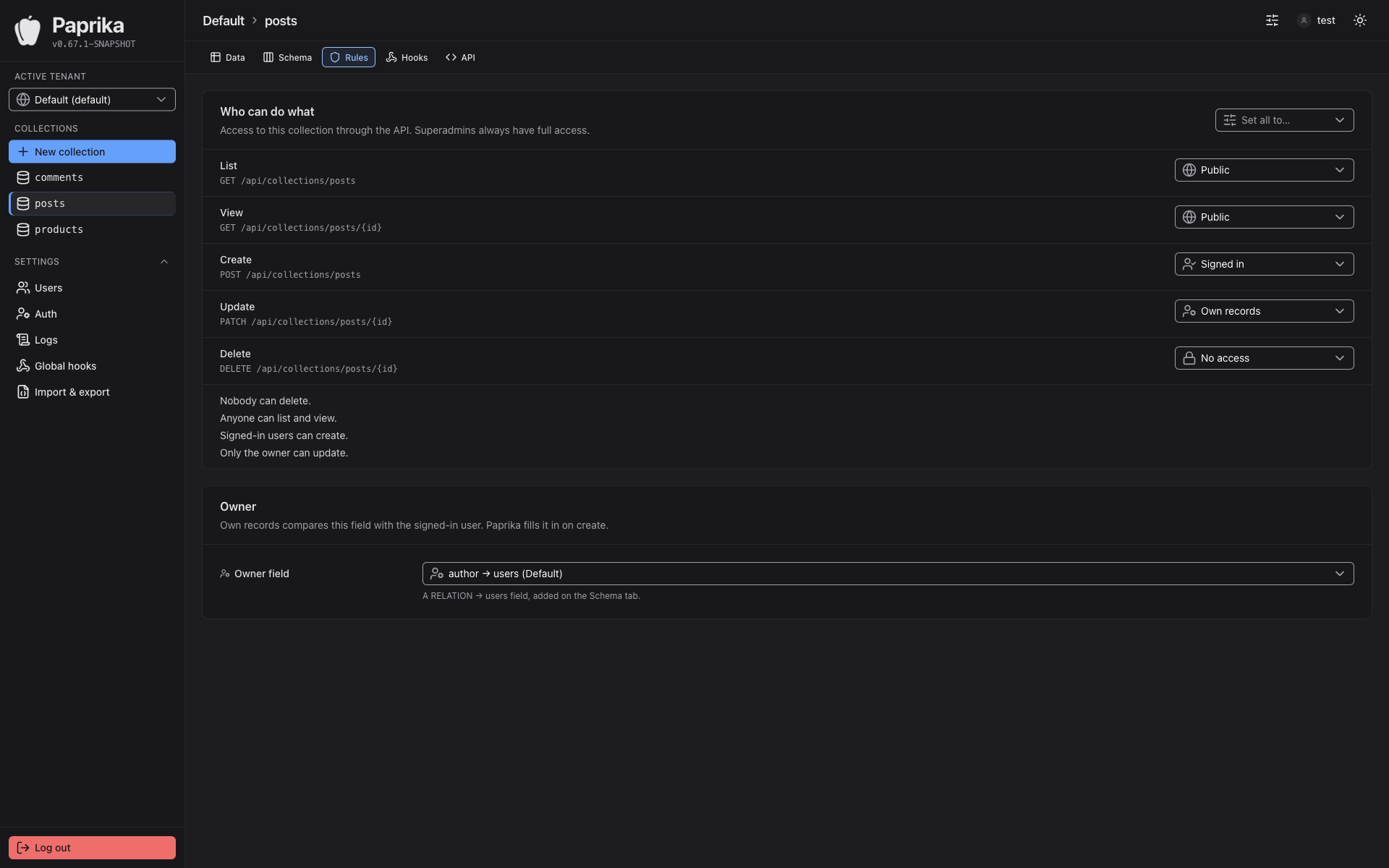
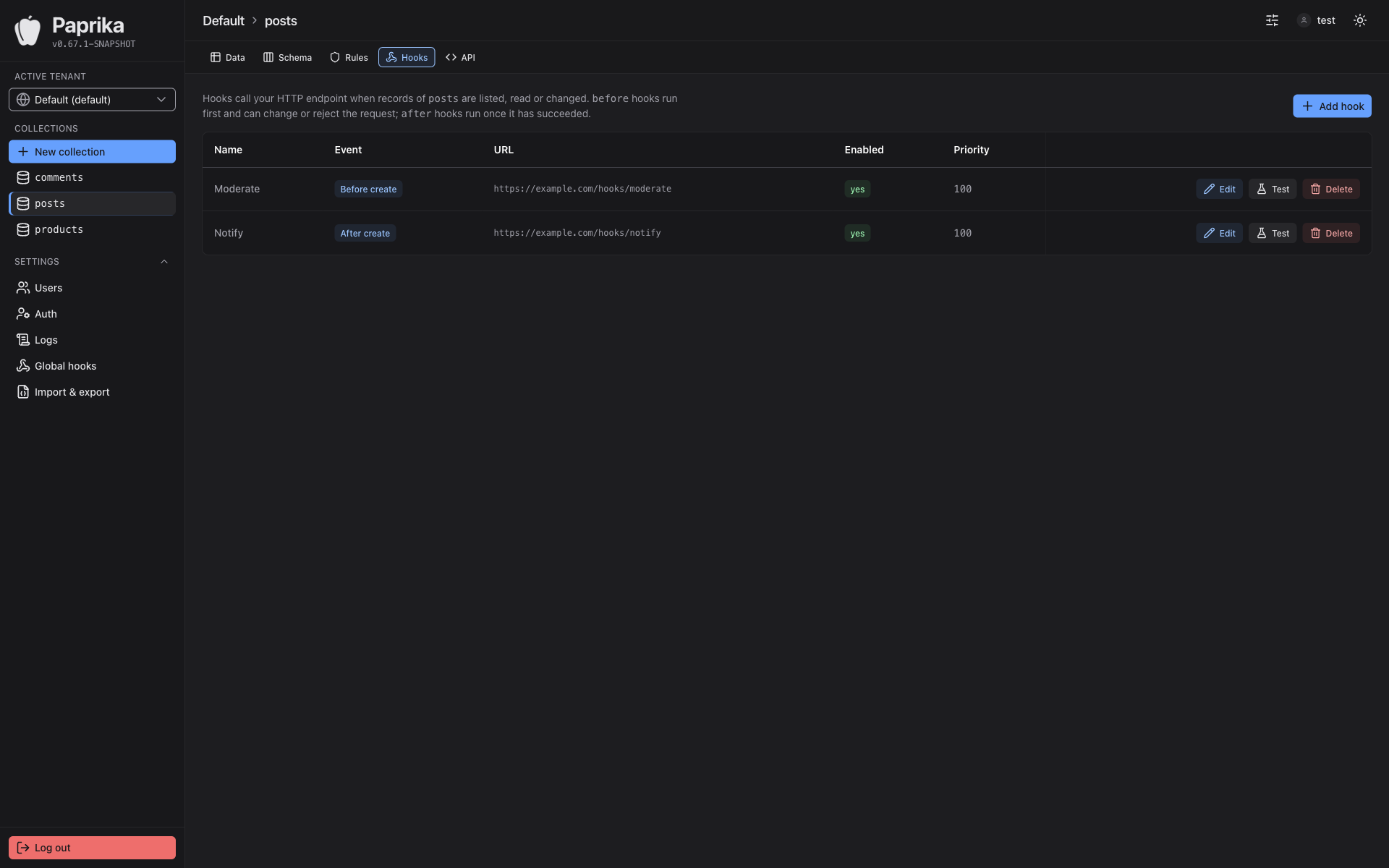
Die Admin-UI, mit der du Paprika einrichtest und betreibst.

The admin UI you use to set up and run Paprika.

paprika.example.com/admin/dashboard
Paprika Admin-UI: Dashboard
Paprika Admin-UI: Collection-Schema
Paprika Admin-UI: Zugriffsregeln
Paprika Admin-UI: Webhooks
Paprika Admin-UI: generierte API-Dokumentation

PreisePricing

Kostenlos für nichtkommerzielle Projekte.
Für den kommerziellen Einsatz gibt es eine Lizenz.

Free for noncommercial projects.
Commercial use requires a license.

Beta Mit Version 1.0 rechnen wir im ersten Quartal 2027. Vorher kannst du die App natürlich testen. We expect version 1.0 in the first quarter of 2027. You can of course test the app before then.

NichtkommerziellNoncommercial

Open Source, private Projekte, Bildung und Gemeinnütziges.

Open source, personal projects, education and nonprofits.

0 €
PolyForm Noncommercial 1.0.0
  • Alle Features und ReleasesAll features and releases
  • Lizenz für nichtkommerzielle Nutzung, Mandanten und Nutzer unbegrenztLicense for noncommercial use, unlimited tenants and users
  • Fragen und Fehler über GitHub IssuesQuestions and bugs via GitHub Issues
Zur DokumentationRead the docs

Enterprise & OEM

Für viele Installationen oder wenn du Paprika für deine Kunden betreibst.

For many installations or if you run Paprika for your customers.

Auf AnfrageOn request
Staffelpreise ab zehn InstallationenVolume pricing from ten installations
  • Alles aus KommerziellEverything in Commercial
  • Lizenz für den Betrieb bei Kunden und als White-LabelLicense for running it for customers and as white-label
  • Eigene SLAs nach VereinbarungCustom SLAs by agreement
Kontakt aufnehmenGet in touch

Gemäß § 19 UStG wird keine Umsatzsteuer berechnet. Paprika läuft immer auf deiner eigenen Infrastruktur. Eine Installation ist ein Paprika-System in Produktion, mit allen seinen Mandanten. Was als kommerziell gilt, steht im Lizenzmodell. No VAT is charged under the German small business rule (§ 19 UStG). Paprika always runs on your own infrastructure. An installation is one Paprika system in production, including all of its tenants. What counts as commercial use is explained in the licensing guide.

Häufige FragenFAQ

Gibt es Paprika auch als gehosteten Dienst?Is there a hosted version of Paprika?

Nein. Paprika läuft immer auf deinem eigenen Server oder in deiner eigenen Cloud. Deine Daten liegen damit nur bei dir. Paprika schickt keine Daten an uns, auch keine Telemetrie, und wir haben keinen Zugriff auf deine Installation. Daten verlassen deinen Server nur dorthin, wohin du sie selbst schickst, etwa an deine Webhooks oder deinen Mailserver.

No. Paprika always runs on your own server or in your own cloud, so your data stays with you. Paprika sends no data to us, not even telemetry, and we have no access to your installation. Data only leaves your server where you send it yourself, for example to your webhooks or your mail server.

Wann brauche ich eine Lizenz?When do I need a license?

Sobald du Paprika produktiv für etwas Kommerzielles einsetzt, zum Beispiel als Backend einer bezahlten App oder eines internen Firmensystems. Private Projekte, nichtkommerzielle Open-Source-Projekte, Lehre und Forschung sind kostenlos. Entwickeln und testen dürfen auch Unternehmen ohne Lizenz.

As soon as you use Paprika in production for something commercial, for example as the backend of a paid app or an internal business system. Personal projects, noncommercial open source, teaching and research are free. Companies may also develop and test without a license.

Was zählt als Installation?What counts as an installation?

Eine Installation ist ein Paprika-System in einer Produktivumgebung, mit allen seinen Mandanten und Nutzern. Betreibst du mehrere voneinander getrennte Produktivsysteme, brauchst du für jedes eine Lizenz. Entwicklungs-, Test- und Staging-Umgebungen sind kostenlos.

An installation is one Paprika system in a production environment, including all of its tenants and users. If you run several separate production systems, each of them needs a license. Development, test and staging environments are free.

Was brauche ich für den Betrieb?What do I need to run it?

Für die Docker-Variante einen Host mit Docker Compose v2, MongoDB wird mitgeliefert. Für das .deb-Paket Ubuntu ab 22.04 oder Debian ab 12 und eine eigene MongoDB.

For Docker, a host with Docker Compose v2; MongoDB is included. For the .deb package, Ubuntu 22.04 or Debian 12 and newer, plus your own MongoDB.

Ist Support enthalten?Is support included?

Mit der kommerziellen Lizenz ja. Du schreibst eine E-Mail an hello@getpaprika.dev und bekommst an Werktagen innerhalb von 24 Stunden eine Antwort. Das gilt für Fragen zu Installation und Betrieb und für Fehler in Paprika. Ohne Lizenz kannst du Fragen und Fehler über GitHub Issues melden, dort gibt es Antworten ohne feste Reaktionszeit.

With a commercial license, yes. Email hello@getpaprika.dev and you'll get a reply within 24 hours on working days. This covers questions about installation and operation as well as bugs in Paprika. Without a license you can report questions and bugs via GitHub Issues, where replies come without a fixed response time.

Lizenz anfragenRequest a license

Anzahl der Installationen und Laufzeit reichen. Du bekommst das Angebot per E-Mail.

The number of installations and the billing period are all we need. You'll get the offer by email.

Nicht sicher, ob du überhaupt eine Lizenz brauchst? Frag einfach vorher.

Not sure whether you need a license at all? Just ask first.

Oder per E-Mail:Or by email: hello@getpaprika.dev

Wir nutzen deine Angaben nur für diese Anfrage. Mehr dazu in der Datenschutzerklärung. We only use your details for this inquiry. More in the privacy policy.